luna: your second brain
A second brain that fills itself, then connects itself. luna is a folder of plain markdown notes on your disk, kept in git and readable in Obsidian. Claude writes notes into it and searches it.
- Decisions outlive the session. What was decided, and why, stays findable long after the session that decided it has ended.
- Less explaining twice. Claude starts from your notes instead of asking you again or rediscovering it with a dozen searches.
- Yours, in plain files. Markdown in git, on your disk. No tool holds it.
Fill your vault, then find things in it
luna runs one loop: capture, ingest, link, recall.
- Capture. Every Claude Code session ends by writing a session
note: what it did, what it decided, what comes next. You do
nothing; the end-session hook writes it. To
add the sessions you ran before luna, run
/luna-backfill --dry-runto see how many there are, then/luna-backfill. A backfill can cost many tokens, so run a large one in batches. - Ingest.
/luna-ingest <github-url>saves a GitHub repo or issue, or a bitbucket.org repo, issue or pull request, as a structured note. Add--dry-runto see the note before it is written. Pages you clip in the browser or send from Telegram land in the inbox, and the clip pipeline files them as notes too. - Link. Each night a job reads the new notes and proposes links between notes that belong together. Each day graphify redraws the map of those links, at no model cost; once a week it also reads the notes for meaning.
- Recall. qmd searches the vault by words and by meaning, and re-indexes it every day. Claude calls it as a tool, and graphify follows the links from what qmd finds to the notes next to it.
See how your notes connect
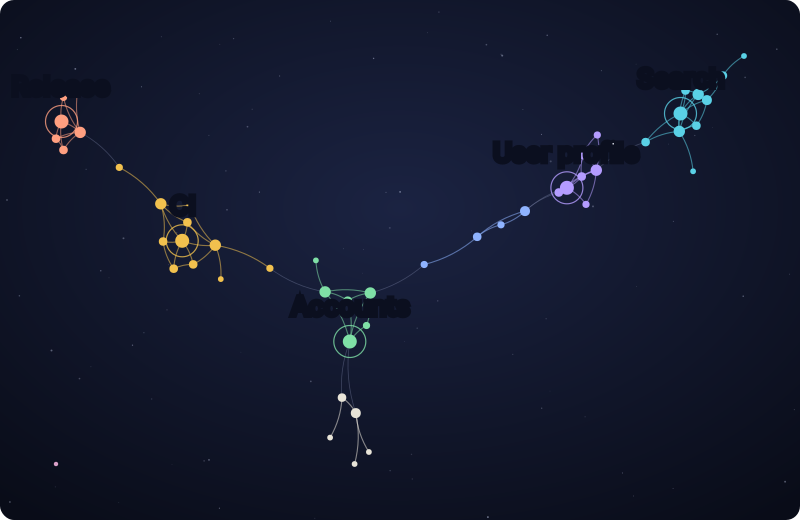
The star map of a 50-note sample vault, drawn from the graph graphify built of it. Each dot is a note and each line a link between two notes. Notes that link to each other a lot form one coloured cluster, and the five clusters with a map note carry its name: Release, CI, Accounts, User profile and Search. Two smaller clusters have no map note yet. The single dot in the lower left is a note with no links yet.
Ask your notes a question
qmd query "what did we decide about caching the user profile?" -c luna-c luna limits the search to the vault. On the sample vault it
returns five notes, best first:
- Decision: 5-minute profile cache (100 %)
- PR 212: clear the cache on rename (62 %)
- Session: stale name after rename (54 %)
- Map: User profile (50 %)
- Lesson: clear a cache where the data is written (49 %)
The session note never says “cache”: qmd found it by its meaning, a
name that stayed on the page after a rename. Each result comes with its
path and the lines that matched; qmd get <file> opens the whole note.
You rarely type this yourself, because Claude runs the same search when
it needs your notes.
Where luna works
Pick the luna profile when you install himmel.
It adds the vault folders, the session-note hook, the qmd index and
graphify to your project. The scheduled jobs, the nightly linking and
the daily re-index and map, run only from a himmel clone today;
bringing them to your project is planned (HIMMEL-6210).
For maintainers
himmel/docs/luna/
Reference docs for himmel features that touch the Luna Obsidian vault.
Per the luna-area docs convention locked 2026-05-25 (see the
CLAUDE.md “Luna-area docs convention” section): operator-facing
reference docs (guides, runbooks, architecture) for luna-touching
features in this repo live here. Personal-state work artifacts
(handovers, decision logs, journal entries) live in <state-repo>.
The star map, site/public/luna/star-map.svg, is drawn from a sample
vault of invented notes, never a real one. It ships with the docs site
only, so this file on GitHub shows its alt text and the caption.
scripts/docs/test-luna-page.sh checks every command on
this page against its skill’s frontmatter and qmd --help.
Contents
end-session-wiki.md: user guide for theSessionEndhook that auto-captures every Claude Code session as a structured note in the Luna vault. Opt-out, dry-run, repo-config.end-session-wiki-schema.md: on-disk schema for session notes the hook writes.compounding.md: how auto-memory + the clipper pipeline compound into vault substrate (the capture map).pr-lane-guard.md: the luna PR-lane isolation guard and its.single-writeropt-out.
Where things go
| Artifact | Lives in |
|---|---|
| Luna-touching reference docs for himmel | himmel/docs/luna/ (here) |
| Luna repo’s own reference docs | luna/docs/ |
| Vault-template reference docs (OSS-bootstrap-ready) | himmel/templates/luna-second-brain/docs/ |
| Plugin specs | plugins/<plugin>/README.md |
| Handovers / work logs / decision journals | <state-repo>/handovers/<USER_SLUG>/<repo-bucket>/ |
| Luna vault content (clips, human notes) | luna vault itself (unchanged) |